ERP implementation in India: steps, timelines and costs for moving off Tally or Excel in phases, with the modules of the ERP ReelsBuddy runs on. Plan yours.
- Published
- Updated
- Reading time
- 16 minutes
Drafted with AI tools; researched, edited and approved by Althameem Ali. Our editorial policy
On this page · 11 sections
- What is ERP implementation, in plain words?
- What are the steps for a growing Indian business?
- How long does it take?
- What does it cost in India, packaged or custom?
- What does a working ERP cover?
- How do you move off Tally or Excel without losing a month's books?
- What do GST and e-invoicing change?
- What goes wrong, and how do you avoid it?
- Frequently asked questions
- What to do next
- Changelog
We build custom ERPs as modules on the Xale platform (reported by our team), so we aren't neutral; this guide covers packaged implementations too, with their partners' published prices, because for small teams they're often the better buy.
It's written for owners and finance heads in India whose sales, operations and accounts now live in separate places, and who want to know what an implementation involves before they choose a product or a builder. Every outside price and rule below was read on 9 October 2026.
What is ERP implementation, in plain words?#
An ERP is one system for the records your teams now keep apart: leads and sales, jobs or production, stock, staff and the accounts, all sharing one database. Implementing it means getting from today's spreadsheets to that system without stopping the business. Whether you buy a product such as Odoo or Zoho or have one configured or built, the same five jobs make up the project:
- Mapping how work and money move today, branch by branch and approval by approval.
- Setting up or building the modules, the users and their rights.
- Moving the data: customers, suppliers, items, ledgers and open balances.
- Training each role on its own screens, with your own data.
- Switching over on a planned date, then fixing what real use shows.
The product decides how much of step 2 is configuration and how much is development. It doesn't remove steps 1, 3, 4 or 5, which is why, in implementers' own guides, the implementation usually costs more than the licences.
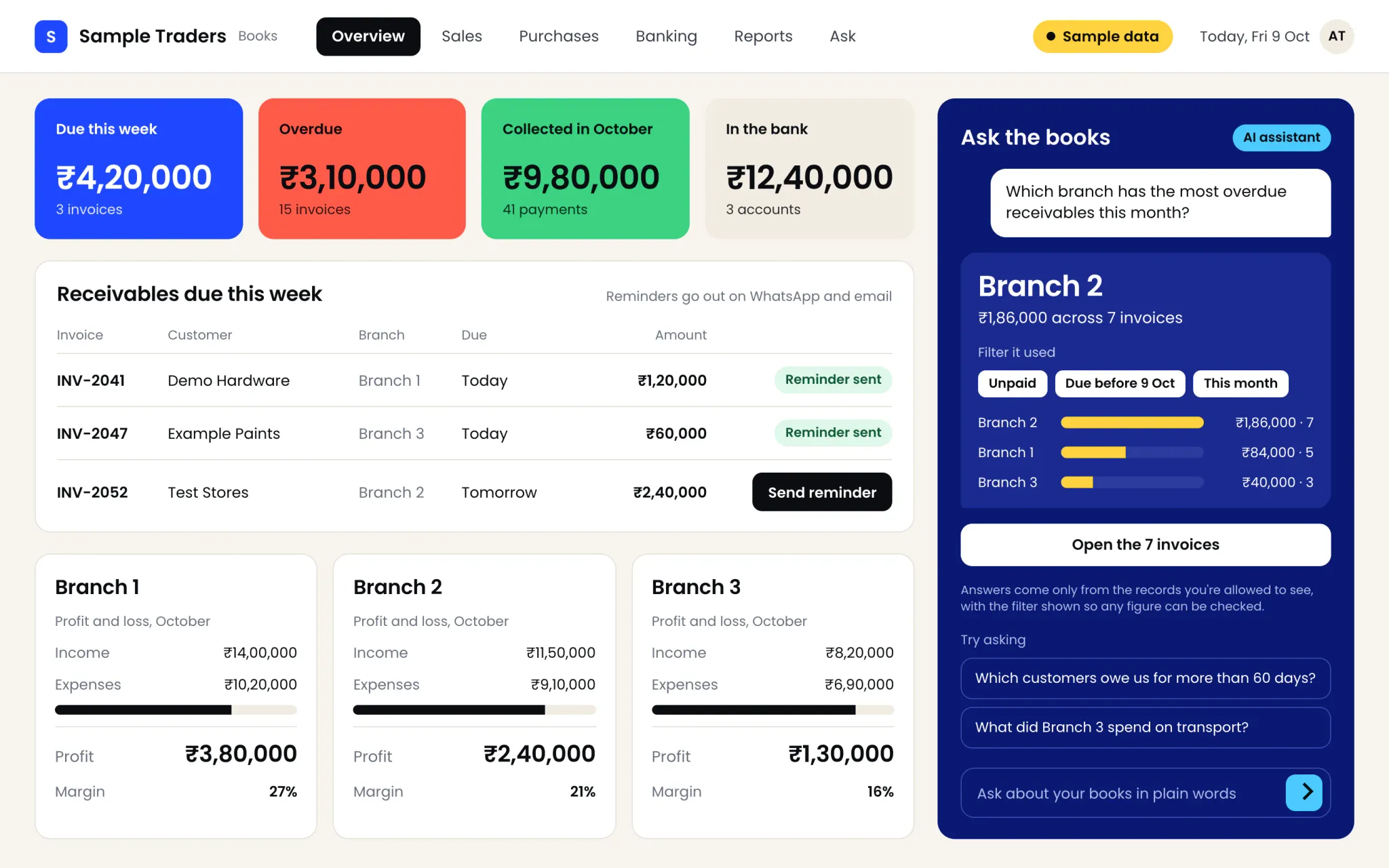
Done well, the result is one screen where a manager sees what used to take three spreadsheets and a phone call: what's due this week, how each branch is doing and, in newer systems, the answer to a question asked in plain words.
What are the steps for a growing Indian business?#
We build ERPs in phases, and a packaged roll-out goes through the same ones:
Phase 3 is the easiest one to skip. A module that runs on real work for a few weeks shows which fields nobody fills, which approvals slow things down and which report the owner actually reads, and every later module is cheaper for it.
Our own route is modules on Xale. The foundation every module needs (users, roles, branches, an audit log and backups) already exists on the Xale platform (opens in a new tab), as xale.in describes it, so phase 2 puts one module live instead of laying groundwork, and the next module is configured or built beside it only once that one is earning its keep. Our team built Xale's CRM, and builds ERP and HR modules on the same platform (reported by our team), and the Xale case study sets out the platform underneath, and what we build on it. A from-scratch ERP, which other builders sell and we don't, has to write that foundation first.
How long does it take?#
For a custom ERP built with us on Xale, the first module, on the foundation the platform already has, takes 8 to 12 weeks, each further module 4 to 8 weeks, and four to six linked modules 5 to 8 months in phases.
Packaged implementations publish similar spans. For Odoo in India, Braincuber's guide of 8 July 2026 (opens in a new tab) gives about 2 to 3 months for 10 to 20 users on one or two core apps, 3 to 5 months for 20 to 50 users with several apps and integrations, and 6 to 9 months for larger, heavily customised roll-outs. UJSS, a Mumbai firm, lists the time per Odoo module (UJSS (opens in a new tab), 11 March 2026):
The calendar usually slips on data and decisions, not on software: a ledger that won't reconcile, or an approval rule nobody can agree on.
What does it cost in India, packaged or custom?#
A packaged ERP has three cost lines: licences, the implementation and support. An ERP on Xale is paid as one fee for the build, in phases. Or, as a subscription, it runs on one of Xale's own plans: priced per workspace, with every feature included and no per-user licence, as Xale's pricing page (opens in a new tab) lists them. A from-scratch ERP, from another builder, has the build, support and hosting.
Odoo's implementation cost has its own guide: our Odoo pricing and implementation cost guide lists every plan, Odoo's Success Packs and four implementers' published ranges side by side.
For the one-fee route, our care plan starts from ₹10,000 a month before GST, and on larger builds support typically runs at 15 to 20% of the build a year. In the UAE, our ERP prices start from AED 20,000 for the first module, AED 10,000 for each further one and AED 60,000 for four to six modules, the same figure in QAR or SAR, before VAT where it applies. Which route costs less depends on your team size and the plan you would otherwise buy; our custom ERP vs Odoo and Zoho comparison sets these one-fee prices beside each Odoo and Zoho plan's licences at 10, 25 and 50 users, and works out where a build breaks even.
Three routes. A packaged ERP such as Odoo or Zoho ERP suits a firm whose work already runs the way the product does, and for a small team it is often the cheaper answer. Modules on Xale suit a firm with an unusual core process, many staff, or heavy WhatsApp and portal work tied to the books: they are configured and extended on a platform that already exists, paid as one fee in phases or as a subscription on one of Xale's own per-workspace plans, and the first module is live in 8 to 12 weeks. A from-scratch ERP is the route other builders sell. We don't, because it has to write users, roles, an audit log and backups before its first module, and on the platform those are already there.
What does a working ERP cover?#
ReelsBuddy, a Marketlube company, runs its business on an ERP our team built, so its modules are a working example of what one system can hold:
Its team also uses a private mobile app our team built on the same system, and its quotations and invoices are made from the ERP's own data, with invoices raised automatically (reported by our team). The ReelsBuddy case study shows the screens, with names blurred. We don't have its roll-out order or dates on file, so we don't claim one.
The lesson for any implementation: money and work belong on the same record. Because each video's card shows the payment still due, production and collections can't drift apart, which is what separate spreadsheets always allow.
How do you move off Tally or Excel without losing a month's books?#
This is the checklist we work through when we move a business off Tally or spreadsheets; it applies whichever system comes next:
- Pick the cut-over date first: the first day of a month, or better, of a quarter or the financial year, so opening balances are clean.
- Clean the masters before anything moves: customers, suppliers and items de-duplicated, with GSTINs, HSN or SAC codes and state codes checked against each other.
- Export the balances, not just the lists: the trial balance on the cut-over date, receivables and payables bill by bill, advances, stock quantities with their values, and open orders.
- Map the old ledgers to the new chart of accounts, and have your accountant sign the map before the import.
- Import and reconcile to the rupee: the new system's trial balance on the cut-over date must match Tally's.
- Run one closing period in both systems, usually a month, and reconcile again before the old one stops.
- Start a new invoice series on the cut-over date, and test the e-invoice connection before the first real invoice.
- Keep the old data, read-only, for as long as your accountant needs the old books.
Migration from one source is part of our four-to-six-module build. Implementers price it separately: Braincuber's breakdown puts migration from Tally or Excel at ₹1 to 3 lakh, and notes that dirty data, not the volume of it, sets the price.
Many firms don't need to leave Tally at all. Running sales, operations and stock in the ERP and sending finished invoices to Tally keeps the accountant in the tool they know.
What do GST and e-invoicing change?#
Invoices from any ERP need your GSTIN, the right tax fields and a numbering series, and larger businesses must report them electronically:
- India: e-invoicing applies to taxpayers whose aggregate turnover exceeds ₹5 crore, from 1 August 2023, under Notification 10/2023-Central Tax (opens in a new tab) of 10 May 2023. Each business-to-business invoice is registered on an Invoice Registration Portal, which returns its reference number. Since 1 April 2025, businesses with turnover of ₹10 crore or more must report each e-invoice within 30 days of its date, as the IRIS e-invoice portal's notice (opens in a new tab) records.
- UAE: under Ministerial Decision 244 of 2025 (opens in a new tab), as amended by Ministerial Decision 66 of 2026 (opens in a new tab), businesses with revenue of AED 50 million or more must appoint an Accredited Service Provider by 30 October 2026 and go live by 1 January 2027; other businesses appoint one by 31 March 2027 and go live by 1 July 2027, and government entities by 1 October 2027. Sales only to consumers stay outside the system until the Minister decides otherwise.
For an implementation, that means the invoice data has to be right from day one, and the connection to the portal or provider has to be tested before the switch. A custom ERP connects to the provider you choose rather than becoming one. Our UAE e-invoicing guide has the field-level detail, and your tax adviser should confirm the set-up.
What goes wrong, and how do you avoid it?#
The problems repeat from project to project, and none of them is the software's fault:
- Everything at once. Five modules going live on the same Monday leave nobody free to fix the first one. Put one module live, then the next.
- No owner inside the business. Someone has to decide what each field means and chase the team to use it. Name them before you start.
- Too many fields. Every mandatory field is a reason to go back to the spreadsheet. Launch with fewer than you think you need.
- Dirty masters. Duplicate customers and mismatched GSTINs carry straight into the new system. Clean them first.
- Customising a product into custom software. If most of a packaged ERP has to be rewritten to fit, you pay per user for software you're effectively building. Decide which route you're on.
- No exit plan. Ask on day one for the database, the documentation and, for a from-scratch build, the source code, in your company's name. On a platform, ask how your data and your configuration export.
Many of these are the same habits a CRM roll-out needs; our CRM implementation guide covers the week-by-week plan and the 30-day review.
Frequently asked questions#
How long does ERP implementation take?#
For a small Indian firm on a packaged ERP, implementers publish about 2 to 3 months for one or two core apps and 3 to 5 months for 20 to 50 users with several apps. Phased projects put one module live first, often within 8 to 12 weeks, and add the rest over the following months.
How much does ERP implementation cost in India?#
Published Odoo ranges run from about ₹1.5 to 4 lakh for a near-standard go-live to ₹4 to 15 lakh for 10 to 30 users and ₹15 to 40 lakh or more for complex roll-outs, before licences, with support at 15 to 20% of the implementation a year. Data migration, integrations and training are often priced as separate lines.
Can we implement an ERP in phases?#
Yes, and for most growing firms it is the safer route: the module that hurts most goes live first, runs on real work, and the next module is added on the same data. Each phase can be reviewed before the next is paid for.
Do we have to stop using Tally?#
No. Many firms run sales, operations and stock in an ERP and send finished invoices to Tally, so the accounts stay where the accountant works. Moving the books as well makes sense when you want one place for accounts, approvals and reports.
What data should be cleaned before migration?#
The masters first: customers, suppliers and items, without duplicates, with GSTINs, HSN or SAC codes and state codes checked. Then the balances on the cut-over date: the trial balance, receivables and payables bill by bill, advances, stock with its values and open orders.
What to do next#
Write down the one process that hurts most today, the people who run it and the reports you wish you had. That's your first module. Then compare a packaged route and a phased build on Xale on the same scope. When you want ours priced, our pricing page has every starting price, and you can talk through your ERP plan with Althameem Ali in a one-hour consultation. Schools, colleges and training institutes choosing between an ERP and a CRM can start with xale.in's guide to ERP vs CRM for educational institutes (opens in a new tab).
Changelog#
- 2026-10-12: Our route is now stated as it is: modules configured and extended on Xale, paid as one fee in phases (unchanged: a first module from ₹4 lakh) or as a subscription on one of Xale's own plans, which are priced per workspace, with enterprise custom deployment and enterprise pricing on request. A from-scratch ERP has its own row in the cost table, as what other builders sell, and the pointer to a break-even build now leads to the break-even section of our custom ERP vs Odoo and Zoho post, which sets our one-fee prices beside each plan's licences. The first module is now described as it is priced: a module on the foundation the platform already has (users, roles, branches, an audit log and backups), not a foundation built for each client. The line on who built what now reads: our team built Xale's CRM, and builds ERP and HR modules on the same platform (reported by our team). The three-routes paragraph is in this guide's own words, and gives the first module's 8 to 12 weeks where it said only that a system on Xale is live in weeks. On 13 October the per-user subscription figure this update first carried was withdrawn: the subscription is now described as Xale's own per-workspace plans, as Xale's pricing page lists them, and no figure is printed for it.
Related services
Written by
Co-founder, Marketlube
Althameem Ali researched, edited and approved this post. Marketlube is a growth partner in Calicut building brands, websites, CRMs and campaigns for businesses across Kerala, India and the Gulf.