SaaS explainer video examples: ten short motion videos we made for Xale CRM, broken down by hook, length, format and the one job each video does.
- Published
- Updated
- Reading time
- 15 minutes
Drafted with AI tools; researched, edited and approved by Althameem Ali. Our editorial policy
On this page · 10 sections
- What makes a SaaS explainer video work?
- What do the ten Xale videos show?
- How do the hook ads open?
- How does a feature explainer show one feature?
- How do you show an AI feature on screen?
- When does a product tour beat a short explainer?
- Which format and length for which placement?
- Frequently asked questions
- What to do next
- Changelog
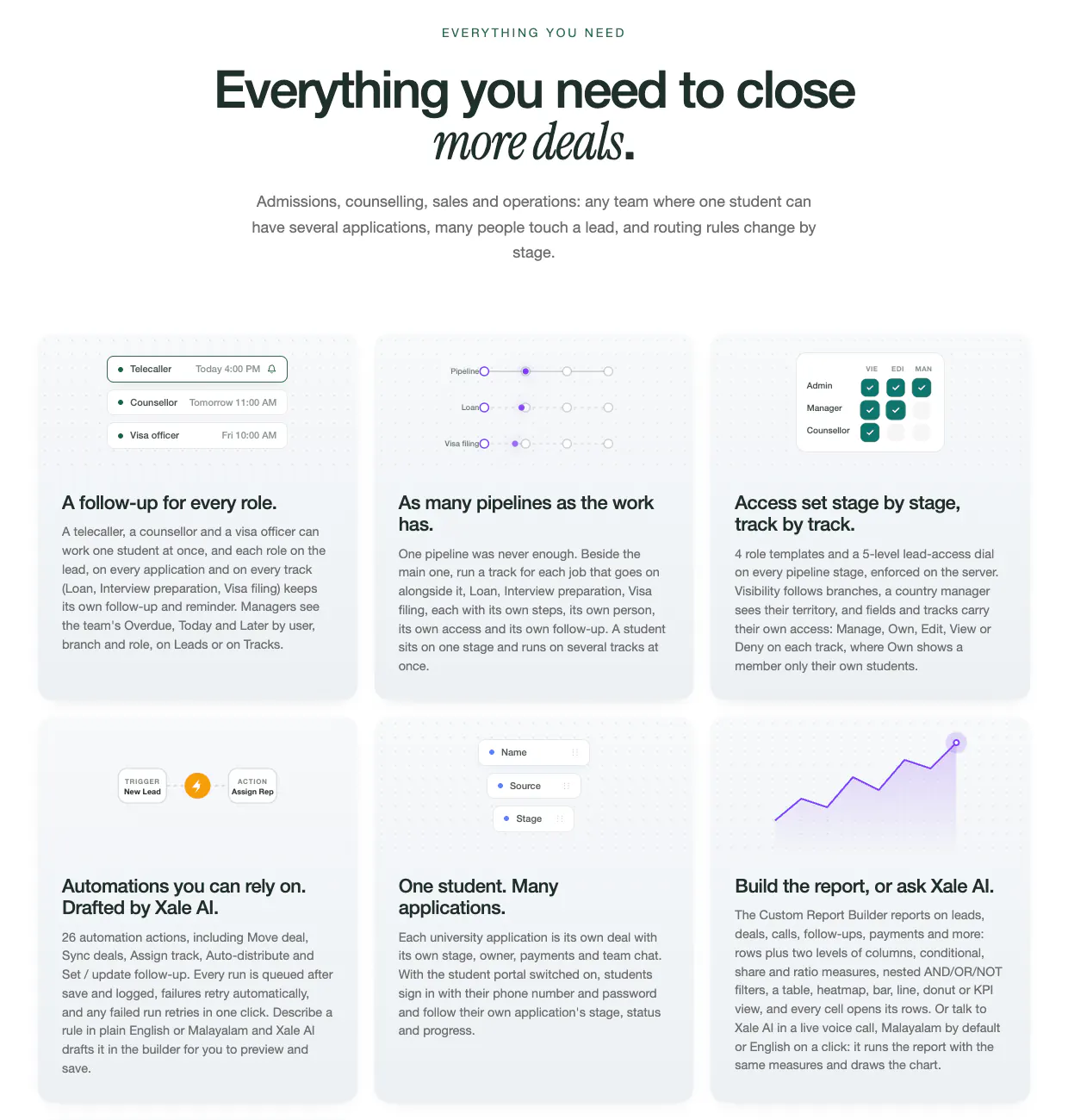
We make SaaS explainer videos, so read this as a breakdown of our own work, not a neutral survey. All ten are short motion videos built around the product's own interface, and the ten videos we made for Xale CRM play in full, with sound, on our service page. Xale (opens in a new tab) is a CRM for study abroad consultancies, colleges and academies, built by the team behind Marketlube and made by Xale Private Limited in Kozhikode. It reports 10,000+ new leads captured every month and 150+ user seats in its largest single workspace (Xale's platform figures (opens in a new tab), September 2026). So we are not neutral about the product either.
Below, each video is taken apart: the line it opens on, its length, its beats with timestamps and the job it was made to do. Lengths are measured from the files; beat times come from frames sampled once a second, so each is accurate to about a second. The names and numbers on screen are sample data, and any figure quoted inside a video is Xale's own.
What makes a SaaS explainer video work?#
Software is hard to film. There is no product to hold up, and a screen recording on its own is a wall of menus. The videos that hold attention follow a few rules, and the Xale set was built on them:
- One job per video. A hook ad earns a click from a stranger. A feature explainer shows one feature to someone already curious. A tour shows the whole product to someone comparing tools. A video that tries all three does none of them.
- Open on the buyer's problem, not the logo. Every one of the ten opens on a question, a number or a situation the buyer recognises. The brand appears as the fix.
- Prove it in the real interface. Each feature is shown in the product's own interface, recreated in motion or recorded from the app, on sample data, so the viewer sees what they would actually use.
- Put every key line on screen. The voice-over carries the pace, but the key lines also appear as large text, so the video still works with the sound off.
- End on one step. Seven of the ten end on a "Book a free demo" card with xale.in; the other three end on xale.in's own page with a demo slot being booked.
- Keep it short. Nine of the ten run 15 to 33 seconds. Only the tour runs about a minute, because its job is breadth.
What do the ten Xale videos show?#
All ten are vertical 4:5 videos (1080 × 1350 pixels, 30 frames a second) with an English voice-over on a bed of music and interface sounds. The "Where it suits" column is our planning view, not a record of where Xale ran them.
That makes two hook ads, four feature explainers, two AI feature films, one positioning film and one tour: a set that covers a buyer from first scroll to the call before a demo.
How do the hook ads open?#
Both hook ads spend their first three seconds on the buyer, not on Xale.
01, "The leads came in. Nobody called." (19.8 seconds)
- 0 to 3 s: "You ran the ads. The leads came in.", over three new-lead cards from a Meta form, WhatsApp and the website.
- 3 to 7 s: "So why aren't they enrolling? Nobody called them back in time." Unopened lead cards read "Not opened", "Waiting 19h" and "No owner".
- 7 to 14 s: "Xale catches every lead." and "Right counsellor. Instantly.": one pipeline, and a lead assigned to a counsellor with a follow-up booked.
- 14 to 19.8 s: "Stop paying for leads nobody calls.", then the demo card.
It works because it names money the viewer has already spent. The opening line is about their ads, the middle is about their loss, and the product arrives only once the loss is clear.
02, "Speed to lead" (18.9 seconds)
- 0 to 2 s: a counter runs up to "42 hours." beside a "Lead waiting" label.
- 2 to 6 s: "That's how long the average business takes to reply to a new lead."
- 6 to 10 s: "Reply within the hour?" and a claim that it makes a lead seven times more likely to qualify.
- 10 to 14 s: "With Xale, it happens in seconds.": a time-stamped log shows a Meta lead landing at 10:02:04 and routed to a counsellor at 10:02:05, with a call prompt.
- 14 to 18.9 s: "Be the first one to call.", then the demo card.
Here the hook is a number. The figures are the ad's own, credited on screen to a Harvard Business Review study of 2,241 companies, and that credit matters: a statistic used as a hook should name its source on screen, or a sceptical buyer stops trusting the rest. The product answer is also a number, a one-second gap in a log, which makes the contrast instant.
How does a feature explainer show one feature?#
The four feature explainers share one shape: a situation the buyer recognises, the gap in one line, the feature filling it, and a closing benefit line. None shows a second feature.
Two details are worth copying. First, the situation is shown, not described: a real-looking chat, a real-looking duplicate warning. Second, the feature is shown changing something: a follow-up date appears, a status moves, a message is delivered and opened. A screen that only sits there reads as a brochure.
How do you show an AI feature on screen?#
AI features are the hardest to film, because a chat box with a paragraph of text tells the viewer nothing. The two AI films in the set treat the AI as the last step of a story about data the viewer already cares about. The feature they show is on Xale's AI page (opens in a new tab).
06, "Numbers you can open" (15.0 seconds). An overdue count climbs from 30 to 48: "Okay... which forty-eight?" At 4 seconds, "In Xale, just tap the number", and the list of overdue leads opens. At 6 seconds, "Or just ask Xale AI": a spoken question, "How many UK leads are overdue?", comes back as a bar chart, with a Malayalam and English switch on screen. The close, "Every number, one tap away", lands at 10 seconds.
09, "Call reports, then just ask Xale AI" (32.6 seconds). The first eight seconds are an owner's questions: how many calls, how many connected, who made the most, and a team lead's WhatsApp promising the report by evening. From 8 seconds Xale's call reports (opens in a new tab) answer them: calls, connected calls, connect rate, talk time, the top caller and a recorded call. Only at 17 seconds does "Now, just ask" bring in Xale AI, which answers three questions in turn ("Who made the most calls this week?", "How many Canada leads are overdue?", "Compare branches this month"), each with a number or a short table, and Malayalam, English and Voice controls on screen.
What carries over to any AI product:
- Earn the AI moment. Both films spend most of their length on the problem and the plain feature. The AI arrives when the viewer already wants the answer.
- Show the question in the buyer's words and the answer as data. A number, a ranking or a chart is believable in a few seconds; a paragraph is not.
- Show the controls that back the claim. If the product answers in two languages or by voice, put that switch on screen rather than saying it.
- Use demo data. Real customer names in an AI demo invite the question of where the data went.
What AI inside a CRM can and can't do is a subject of its own, which our guide to AI in CRM covers. These films are designed motion graphics, not AI-generated footage; when generated video is the right tool is a separate question, answered in our guide to AI-generated video ads or a real shoot.
When does a product tour beat a short explainer?#
10, "Xale product tour" (58.5 seconds). It opens like the others, on a problem ("Every missed follow-up is a lost student") and a one-line introduction ("Meet Xale. The CRM built for study abroad teams."). From 7 to 48 seconds it walks through ten labelled screens of the real app on demo data, about four seconds each: the dashboard, follow-ups, leads, the pipeline, role follow-ups, WhatsApp, automations, call analytics, team performance and reports (the features themselves are on Xale's features page (opens in a new tab)). It closes on "One CRM. Built for how your consultancy works." and "Stop losing students to missed follow-ups."
A tour wins when the viewer already knows the problem and is asking "what else does it do?": on the website, in a reply to someone who asked for a demo, or in a sales deck. It loses as a cold ad, because nothing in it is built to stop a stranger's scroll. The label on each screen does the work a voice-over can't keep up with at four seconds a screen.
Explainer, tour or demo video: which does what? Our planning view:
Which format and length for which placement?#
All ten were made at 4:5, which fills more of a phone screen in a feed than a square while staying usable on WhatsApp and a website. Other placements need their own cuts:
A 9:16 recut is not a stretch of the 4:5 file: the top and bottom of a Reel are covered by the account name, the caption and the buttons, so headlines and numbers have to move inwards. Our guide to short-form video formats that sell in the Gulf covers those safe areas and why ads in smaller markets need fresh cuts more often, and our list of corporate video ideas has longer formats for the website and sales team.
Frequently asked questions#
What's the difference between a product demo video and an explainer video?#
An explainer is short and built around one problem and one feature, made to be understood by someone who has never seen the product. A demo video walks through the product doing a real task from start to finish, runs for several minutes and is made for people already evaluating it. A product tour sits between them: the whole product in about a minute, one screen at a time.
How many videos does a SaaS launch need?#
At least one for each job the launch has to do: one or two hook ads to test on cold audiences, one explainer for each feature the launch is about, and a tour for the website and sales follow-ups. The Xale set shows that spread with ten: two hook ads, four feature explainers, two AI feature films, a positioning film and a tour.
Should a SaaS explainer video have a voice-over?#
A voice-over helps where sound is on, such as YouTube, websites and WhatsApp, but a feed can start a video muted, so the voice can't carry the story alone. The Xale films use both: an English voice-over for pace, and every key line on screen, so each video works with or without sound.
What to do next#
Pick the one job your next video has to do, write its first line as your buyer's problem, and choose the single screen that proves the fix. If you'd like a team to make them, the ten Xale videos are the standard we work to, and a pack of three starts at ₹10,000 (from AED 400 in the UAE and GCC), with the length, formats and rounds of changes agreed in the brief. Want three like these? See SaaS explainer videos, or read how Xale itself was built and grown in the Xale case study.
Changelog#
- 2026-10-12: Linked xale.in where the breakdown names the product and the features on screen: its home page, its AI page, its call recording and reports page, and its features page. Xale's figures now read as xale.in publishes them today (its fact sheet, read 12 October 2026): 10,000+ new leads captured every month and 150+ user seats in its largest single workspace (Platform figures, September 2026). The older user and lead totals are gone, because xale.in no longer publishes them.
Related services
Industries
Written by
Co-founder, Marketlube
Althameem Ali researched, edited and approved this post. Marketlube is a growth partner in Calicut building brands, websites, CRMs and campaigns for businesses across Kerala, India and the Gulf.